Checked first. Then watched.
For families raising kids on the internet that actually exists in 2026 — not the one we grew up explaining to each other. Pixelproofed checks a video against your family's rules before your kid presses play. The library gives you the agreements to talk it through.
Apps that do the work. Documents that talk it through.
Pixelproofed
Checks YouTube videos against your values before they play. Skips, mutes or blurs the moments you'd skip — or asks you first.
How it worksMarvis
Turns school emails, class chats and flyers into one calm list per child — with reminders, clash-spotting, and answers out loud.
See MarvisPixelproof Family
One set of family rules across every screen in the house — laptops and tablets first, then phones, TVs, consoles and the devices kids wear.
See the planThe Library
Family Digital Agreements by age, setup kits and response guides. Instant PDF, printed at home, signed at the kitchen table.
Shop 13 titlesYour rules go in. A decision comes out.
Built for the moment a nine-year-old picks the next video — not for a weekly report nobody reads.
Set your values
Seven categories, five stops each. Start from Careful, Middle or Relaxed and move any slider.
Your kid picks a video
On the family laptop or tablet. The video holds while it's checked — usually under a minute.
We check the whole thing
Captions, audio and sampled frames, mapped to a timeline. Not the title. Not the thumbnail.
It plays, edited — or asks you
Moments you'd skip are skipped. Anything that needs your judgement lands on your phone.
Five outcomes. No mystery.
The shape of the mark carries the meaning, so it reads the same to a six-year-old and a parent in a hurry.
It plays.
A small Pixelproofed mark in the corner.
"Skipped 6 seconds."
Never the reason. Notches show on the progress bar.
"We've asked Dad about this one. It's not a no."
One-tap approve on your phone.
"Not this one."
The category, not the moment. "Ask anyway" is always there.
"We couldn't check this one."
Live or offline. It never plays unchecked.
Rules that grow up with your kid.
Three agreements, each written for a stage — read aloud together, edited in pen, signed by everyone. Parents make commitments too.
"Once per quarter, your kid can tell you about a mistake — and there is no phone consequence for the telling. No questions about how we found out. We help fix what can be fixed. We move on."
In every agreement. The most important page in the document.
One family. Every screen.
Today Pixelproofed covers YouTube on the family laptop and tablet. The plan is one set of family values that follows your kid to every screen in the house. We label what's built and what isn't.
Opinions, stated plainly.
Read before the next app arrives.
Five to ten families. Free. By invitation.
If you have an invite code, start now. If you don't, leave an email — we'll write when there's room, and not otherwise.
Checked first.
Then watched.
Pixelproofed reads the whole video — captions, audio and sampled frames — and checks it against your family's rules before it plays. It catches most of what you'd want to know about, and shows you exactly what it checked.
Built for the family laptop and tablet.
Chrome extension
Holds every YouTube video until it's decided. Applies skips, mutes and blurs, and puts notches on YouTube's own progress bar.
Kids' player
A browser player paired by QR code. Search, a ready-now list, and "Who's watching?" for siblings.
Parent app
Requests, one-tap approvals, full reports, a values editor, and a pixel timeline to cut any section yourself.
Move a slider. Watch the decision change.
This is the real rule set from the app, run against one example video. Stop labels are the rule — no hidden scoring.
Rules for Maya, 8
Example childWhat it checks — and what it can miss.
A tool that claims to catch everything is lying to you. Here's the honest version.
- Captions, spoken audio and a frame every two seconds
- Language, scary moments, violence, sexual content, substances, risky stunts, ads and sponsors
- Each finding with a timestamp and a confidence level you can see
- YouTube's own ads, comments and sidebar — every report says so
- Live streams and videos over 60 minutes
- The YouTube app on phones and TVs, other browsers, incognito windows
Nothing about your family is readable by us.
Stays on your devices
- Your kids' names and ages
- Your values and your cuts
- What each child picked, and your decisions
- Watch history — clear it any time
What our server sees
- A video ID to check — never linked to your family
- Encrypted messages between your devices, which we can't open and delete on delivery
- No IP addresses stored with video IDs
Free for pilot families. For as long as it runs.
We're starting with five to ten families in the US, Canada and Australia. You'll need a Chrome laptop or Chromebook, or a tablet, and about five minutes to set up.
Everything the school sends,
in one calm list.
Forward the school emails to your family's own Marvis address, share a class chat, or snap a flyer off the fridge. Marvis works out which child it's about, what's due, when, what to bring and what it costs — then builds one list per child.
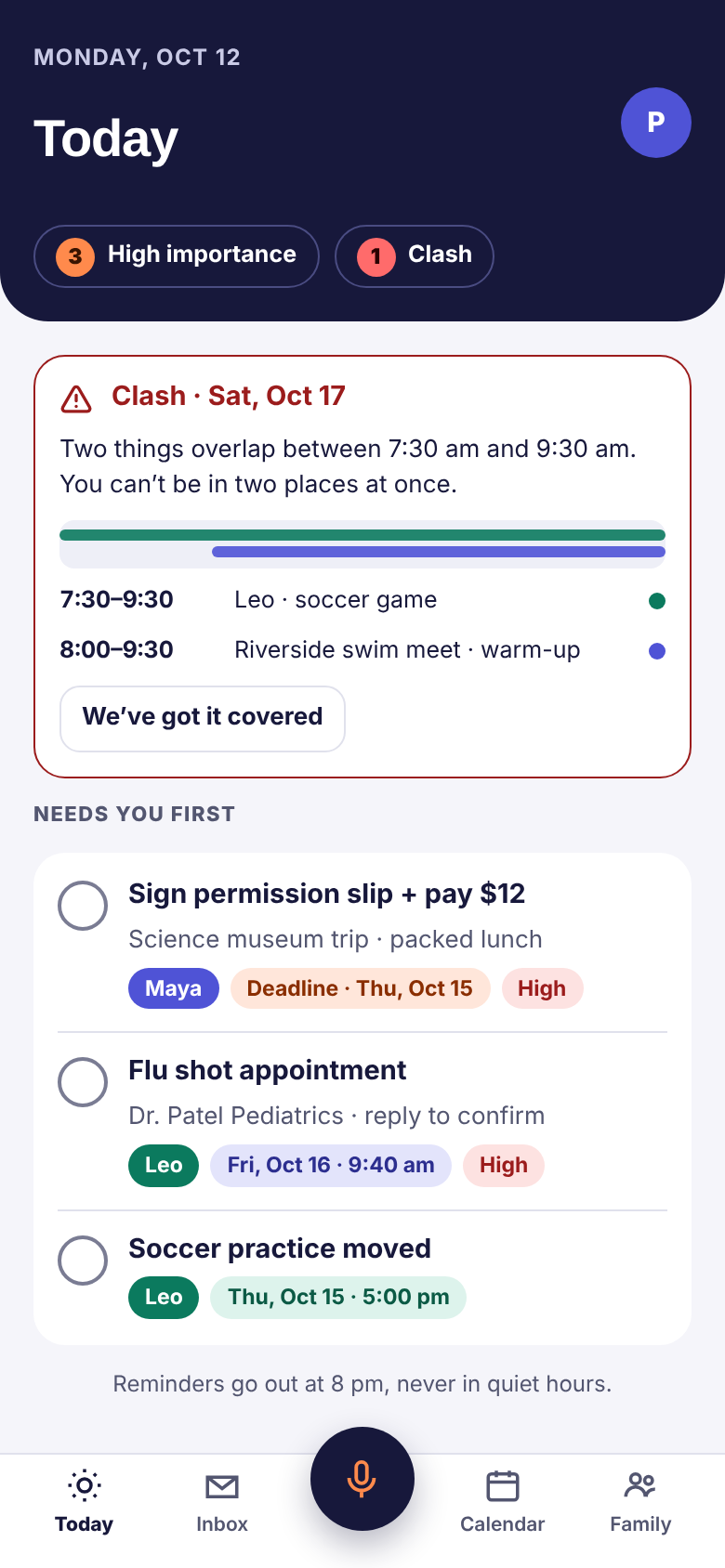
You send it. Marvis sorts it.
No new inbox to check, no app for the school to install. Marvis reads only what you hand it.
Forward the email
Your family gets its own Marvis address. Forward the newsletter, the permission slip, the dentist reminder — or set a filter once and let the school's address forward itself.
Share a class chat
In WhatsApp, open the chat, tap Export chat, choose Without media and share it to Marvis. One chat at a time, and only the ones you pick.
Snap the flyer
The paper that came home in the bag. Take a photo and Marvis reads the date, the cost and what to bring, the same as it reads an email.
One list per child. And the reasons behind it.
Early screens from the app, with a sample family.
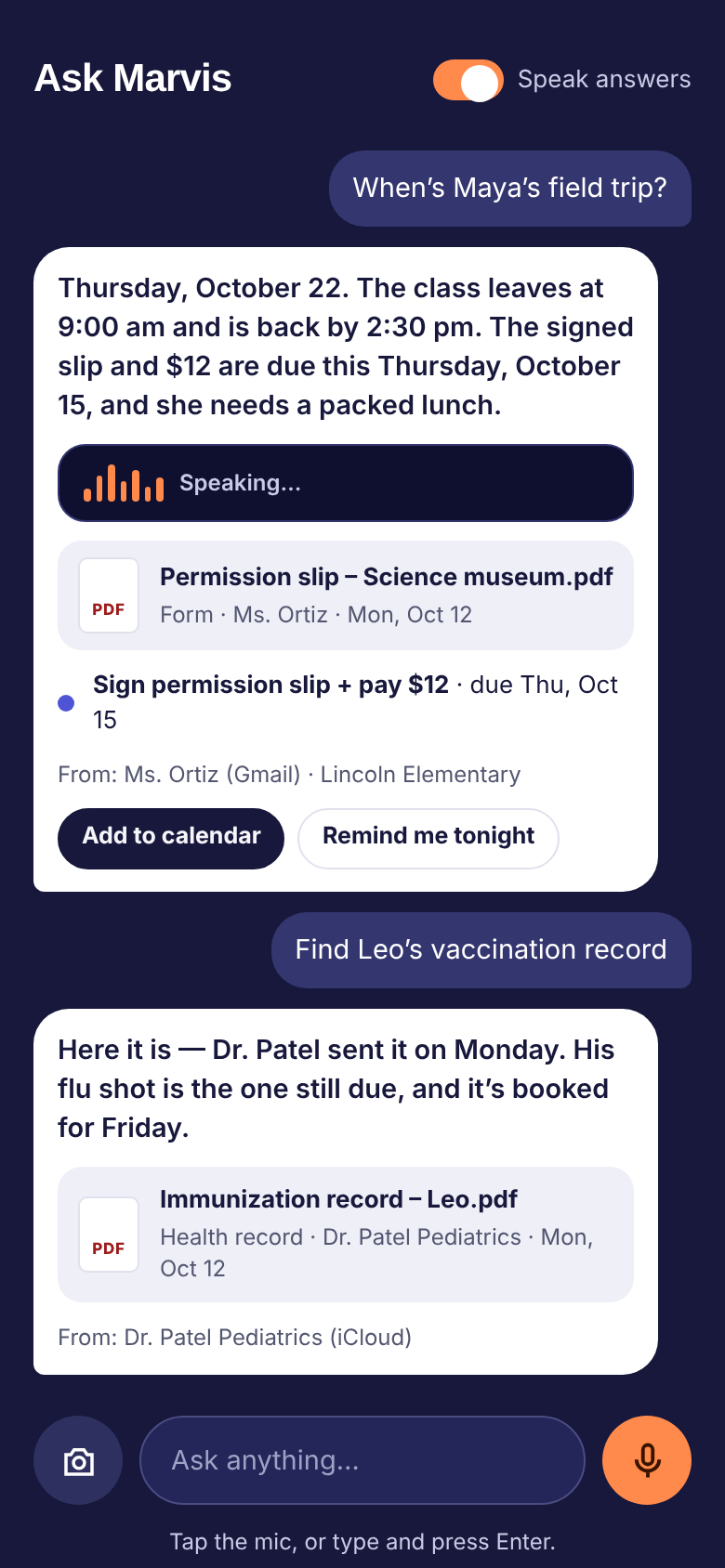
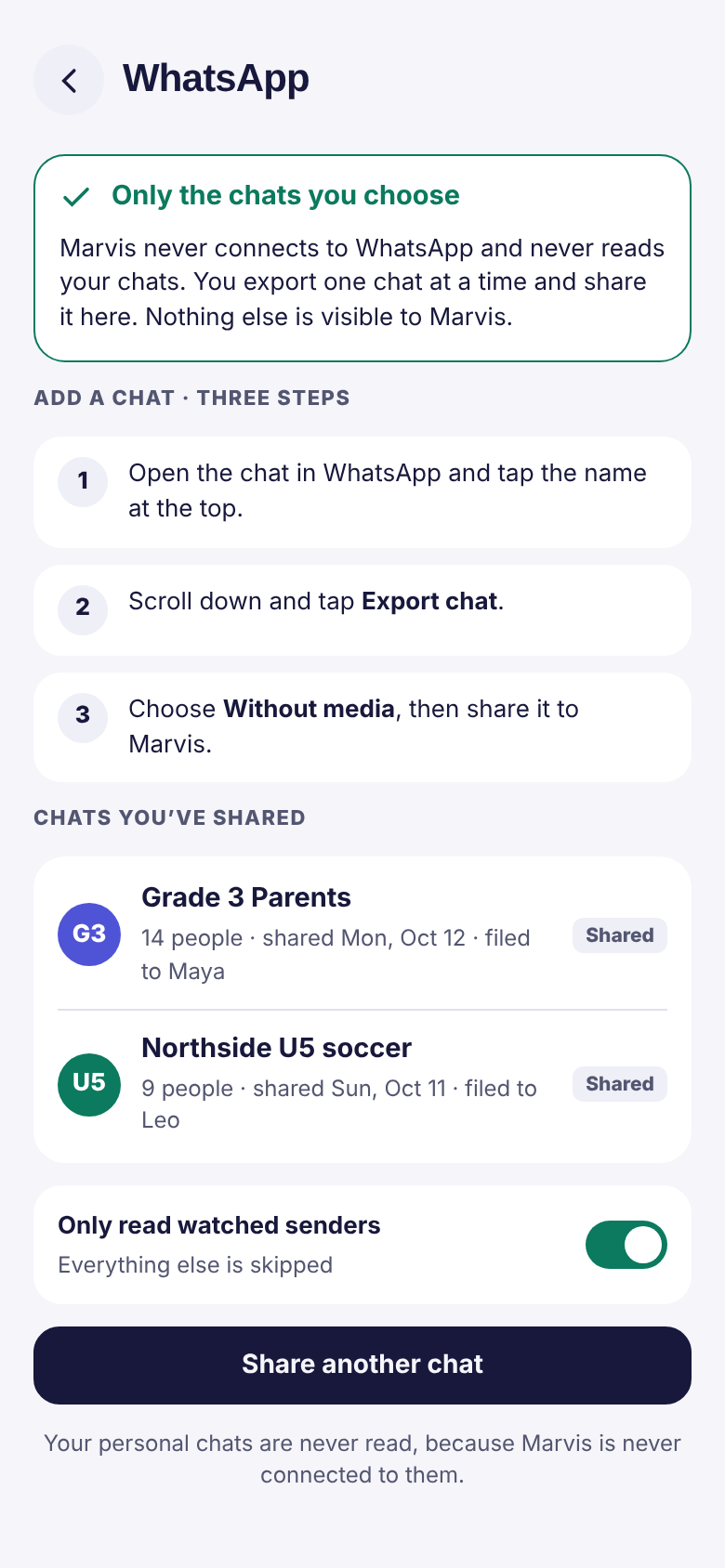
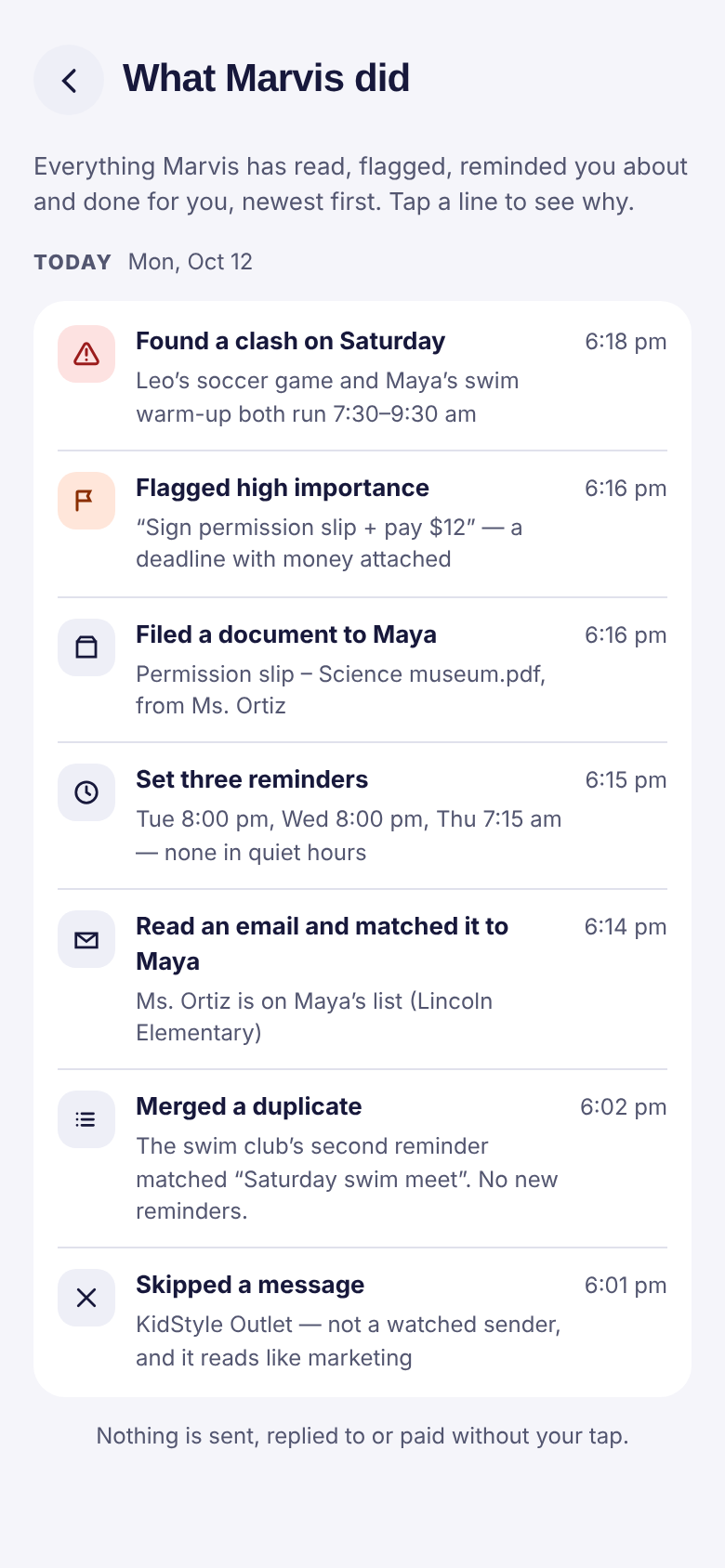
The admin, not the parenting.
Knows which child
By the sender, the class, or the name in the message. Two kids, two lists, no sorting by hand.
Pulls out the details
What's due, when, what to bring, what it costs — and files the attachment under that child.
Flags what matters
Appointments, payments, deadlines and parent meetings rise to the top. The bake-sale thread doesn't.
Spots the clashes
Checks new dates against the calendar already on your phone and tells you before the Saturday arrives.
Reminds at sensible times
Two days before, the night before, the morning of. Never inside your quiet hours.
Answers out loud
"When's Maya's field trip?" "Find Leo's vaccination record." Spoken back, with the source shown.
Finds the free time
Ask for an hour to do the camp forms and you get two or three options, not a blank calendar.
Shows its working
A "What Marvis did" feed lists everything it read, flagged, filed, merged and skipped — and why.
It reads only what you hand it.
How little it sees
- Only the senders and chats you choose
- WhatsApp one chat at a time, through Export chat — your personal chats are never read
- Your calendar stays on your phone
- Face ID or a PIN to open the app
What happens to it
- Forwarded mail is deleted from the server once your family's phones have it, or after 30 days
- "Delete everything" is one tap
- Marvis never sends, replies or pays without your tap
- Co-parents can share one family
One family, shared.
Co-parents can share one family, so the permission slip doesn't get signed twice and the dentist appointment isn't news to anybody. Same lists, same reminders, one tap each.
Coming soon to iPhone and Android.
Marvis is in testing with a small group first — TestFlight on iPhone, internal testing on Android — before it goes to the App Store and Google Play. If you'd like a place in that group, say so and we'll write when there's room.
Straight answers.
Do I have to hand over my Gmail password?
No. Marvis gives your family its own forwarding address. You forward the messages you want it to read, or set one filter in Gmail so the school's address forwards itself. Marvis is never signed in to your mailbox.
How does WhatsApp work?
One chat at a time, by hand. Open the chat, tap Export chat, choose Without media, and share it to Marvis. There's no connection to WhatsApp and no background reading, so your personal chats are never seen.
What does Marvis actually store?
The lists it builds for your family, the documents you've shared with it, and the senders and chats you've chosen. Forwarded mail is deleted from the server once your family's phones have it, or after 30 days. Your calendar stays on your phone — Marvis reads it to spot clashes and never copies it anywhere.
Can it email the school back, or pay a fee?
Not on its own. Marvis never sends, replies or pays without your tap. It will draft and line things up; the last move is always yours.
Can both parents use it?
Yes. Co-parents share one family, with the same lists and the same reminders.
Is it the same thing as Pixelproofed?
No. Pixelproofed checks what your kids watch. Marvis handles the family admin that lands in your inbox. Both are from Pixelproof Kids, and each works on its own.
Set your rules once. Every screen follows.
Families don't have one device. They have a laptop, two tablets, a TV, a console, a watch and a speaker in the kitchen. Pixelproof Family is our plan to put one set of family values behind all of them — checked the same way, explained the same way, with the same privacy promise.
Built, next, and not yet.
We'll keep this page current. "Exploring" means we haven't built it — and we'll say so until we have.
Free to start. Pay when it covers the house.
Pricing isn't set. We'll publish it before anyone is asked to pay — and the library stays a one-time purchase.
Pilot
- Pixelproofed on Chrome and tablets
- Parent app with requests and reports
- Up to 4 children
Pixelproof Family
- Every covered device in one family profile
- Both parents on one household
- Books and music reports
- The full library included
The Library
- Family Digital Agreements by age
- Setup kits and response guides
- Print as many copies as your family needs
In the order we'll build it.
YouTube on laptops and tablets
Chrome extension, kids' tablet player, parent app. Pilot with 5–10 families; measuring accuracy, scan time and cost.
Books and music reports
Book reports by chapter and page, song reports with mute-only edits, and a barcode scan for physical books already reported.
One family profile
Two parents, several kids, one household. Values set once and synced end-to-end encrypted to every paired device.
Phones and TVs
Where the YouTube app and streaming apps live. Depends on what each platform allows — we won't ship a workaround that breaks their rules.
Consoles, wearables and the home network
Kids' watches, game consoles, smart speakers and the router. Research, not a promise.
More devices won't mean more watching.
- No location tracking, message reading or keystroke logging — that's surveillance, and it teaches kids to hide.
- No selling or sharing family data. There's nothing readable to sell.
- No "safe" badges or guarantees. We show what we checked.
- No scores, rankings or reports about your kid. Reports are about the video.
Agreements, kits and guides.
Instant download. Print at home on US Letter. One purchase covers your whole household.
Plain guides for the apps in your house.
Written by the Pixelproof Kids editors. We name the apps, say what we think, and admit when the answer is "it depends."
Not surveillance disguised as parenting.
Most family tech tools are too vague to be useful, too one-sided to stick, or already out of date. We started with printed agreements families write together, and we're building software that follows the same idea: your rules, applied honestly, with the reasons shown.
What we'll defend.
Like an editor, not a marketer.
- We name specific apps — Roblox, TikTok, ChatGPT — not "the internet".
- We treat kids as capable. No baby talk.
- We say "it depends" when it does, and cite research where it exists.
- We don't fearmonger, and we don't pretend one rule fits every family.